Events from Expo apps account for about 75% of the total event volume we receive from React Native apps. That number made it an easy decision to invest in updates to the Sentry React Native SDK to improve the debugging and performance workflow for your Expo apps.
With these updates, you can now:
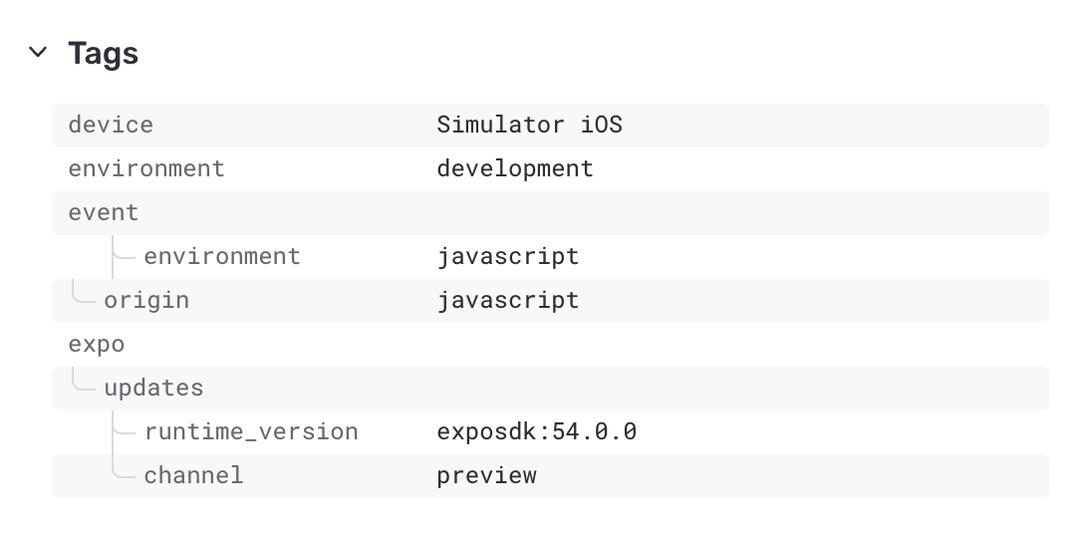
Filter issues by OTA update channel or version to instantly narrow down whether a problem is tied to a specific update
Get alerted on emergency launches so you know when your OTA pipeline is failing before users report it
Track EAS Build health in Sentry so you don’t have to dig through build logs to find out what broke
See the full picture of navigation performance including prefetch timing and asset loading
Automatic OTA update context on every event
When you ship over-the-air updates with Expo Updates, things can go wrong in ways that are invisible without the right context. Which update channel was the user on? Which runtime version? Was this the embedded bundle or a downloaded update?
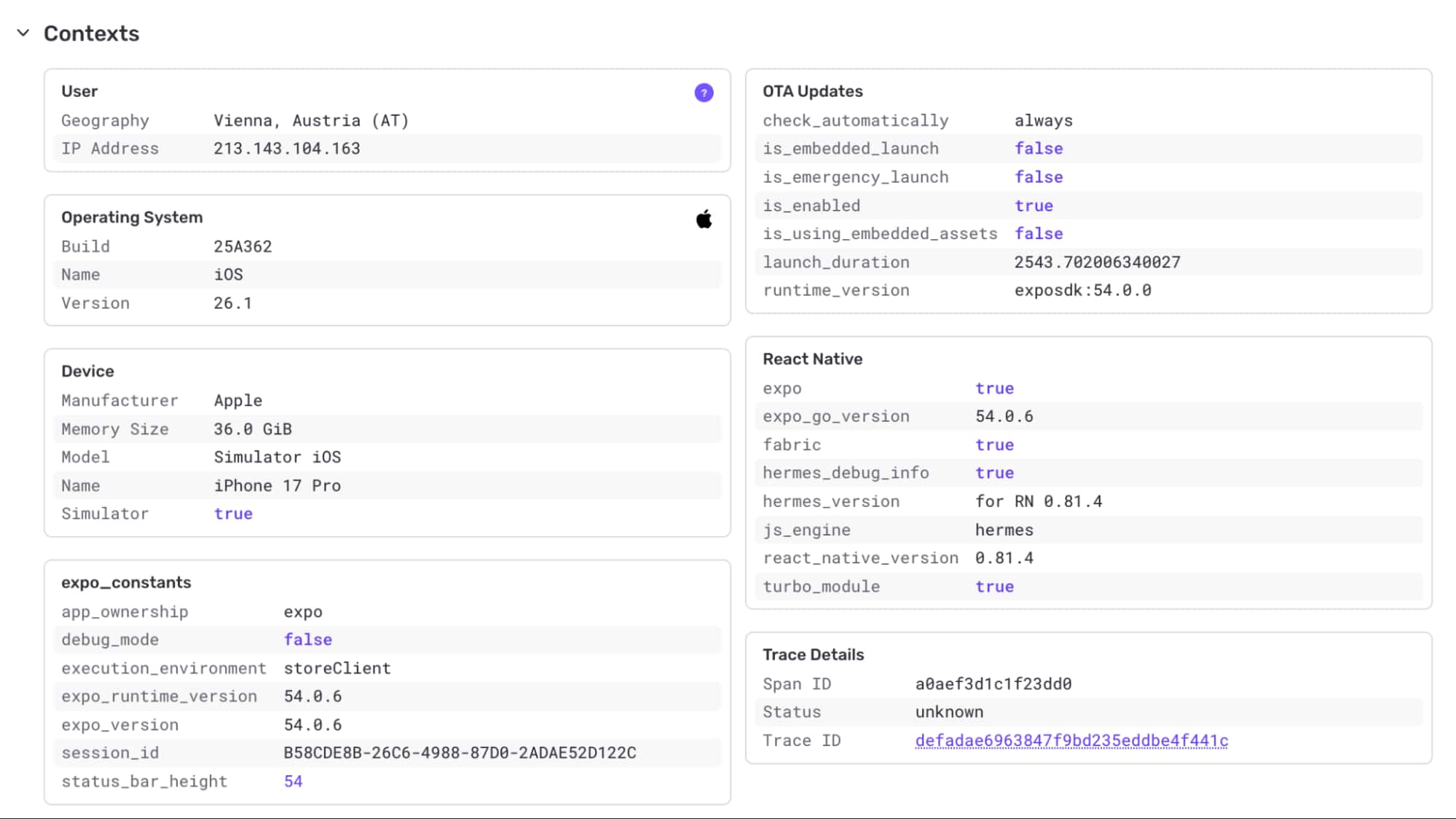
Now, every Sentry event is automatically enriched with an ota_updates context, with no other setup required. You get the update ID, channel, runtime version, launch duration, and whether the app is using embedded assets. All of this is captured out of the box in Expo projects.
We also set searchable tags (expo.updates.channel, expo.updates.runtime_version, expo.updates.update_id) on every event, so you can filter your issue stream down to a specific channel or update with a single search query.
Emergency launch detection
Expo Updates performs an emergency launch when it fails to load the latest OTA update and falls back to the embedded bundle. When this happens, your users are silently running an older version of your app, and you might not even know.
The SDK now detects emergency launches at startup and automatically sends a warning-level event to Sentry with the reason. You can set up an alert on the expo.updates.emergency_launch tag and know immediately when your update pipeline is broken in production.
EAS build hooks: Track build failures in Sentry
Build failures in EAS Build happen on remote infrastructure, outside your local environment and outside your app. Until now, debugging them meant digging through EAS build logs manually.
With the new EAS Build Hooks, you can send build lifecycle events directly to Sentry. Add three script entries to your package.json (or just one if you prefer the combined on-complete hook) and every failed build will send an EASBuildError event with the build platform, profile, build ID, git commit hash, and CI status.
You can also capture successful builds to give you a complete picture of your build pipeline health right inside Sentry. All events are tagged with eas.* tags for easy filtering and alerting.
Setup is minimal: point the hook scripts at the ones the SDK provides, set your DSN as an EAS secret, and you’re done. Check out the EAS Build Hooks documentation for setup instructions.
Performance spans for Expo Router prefetching
Expo Router v5 introduced router.prefetch() to preload routes before the user navigates to them. It’s a great tool for perceived performance, but until now, prefetch timing was invisible in your traces.
Wrapping your router with Sentry.wrapExpoRouter(useRouter()) now creates a navigation.prefetch span for each prefetch call. You can see exactly how long route preloading takes alongside your other navigation spans, and identify routes where prefetching is slow or unnecessary.
Expo constants and environment context
Every event from an Expo app is automatically enriched with an expo_constants context containing metadata about the execution environment: where the app is running (Expo Go, standalone, bare), the app name and version from app.json, Expo SDK version, EAS project ID, and debug mode status.
Combined with the OTA updates context, this gives you a complete picture of the environment for every event without writing a single line of configuration code.
Image and asset loading instrumentation
Image and asset loading is one of the biggest contributors to how fast your app feels. We’ve added automatic performance spans for two of the most common Expo packages:
expo-image: Wrap Image with Sentry.wrapExpoImage(Image) once at startup, and every Image.prefetch() and Image.loadAsync() call gets a performance span.
expo-asset: Wrap Asset with Sentry.wrapExpoAsset(Asset) for spans on Asset.loadAsync().
Both wrappers are safe to call multiple times, create spans only when a trace is active (zero overhead otherwise), and don’t require expo-image or expo-asset to be installed. They’re peer dependencies.
Getting started
All of the OTA update and constants context is enabled by default. No configuration, no extra dependencies. For build hooks and performance instrumentation, setup is a few lines of code. Make sure you’re on version 8.10 to get the latest improvements and fixes.
Don’t have a Sentry account yet? Sign up for free, the developer plan includes everything you need to instrument an Expo app end to end. Have feedback on these integrations or ideas for what should come next? Open an issue on getsentry/sentry-react-native or drop into our Discord.
Sentry's Flutter SDK 10.0 makes streaming traces the default, fixes crash-free rate accuracy for unhandled errors, and adds dedicated app startup traces on Android and iOS.
The OpenTelemetry instrumentation packages needed a Node module loader, a package.json file, and a mutable exports object. v11 replaces all of that with a source transform and diagnostics channels, so tracing now works on Cloudflare Workers, Bun, Deno, and bundled server deployments.
With Unreal Engine 5.8, your coding agent can drive the editor through Unreal MCP. The Sentry plugin adds tools and skills so it can set up Sentry, upload debug symbols, and root-cause crashes for you.